 ClockWork
How people agree to texts
Last updated September 28, 2026
ClockWork, by Central Trade LLC, texts from (877) 908-8777. It sends only two kinds of messages, both to employees of businesses that use ClockWork, and never marketing. Each kind has its own way of agreeing to it.
1. Sign-in codes: the person asks for one
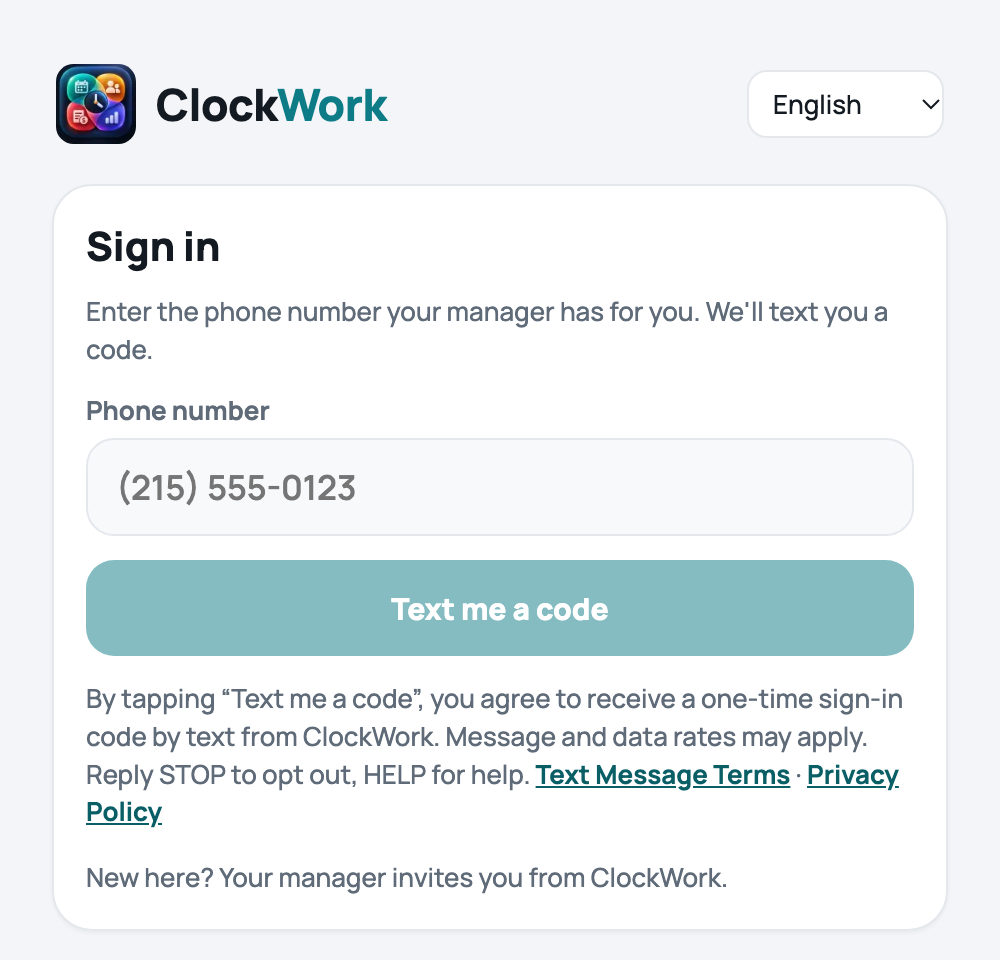
An employee who has joined the ClockWork app signs in at clock-work.app/me/signin: they type their own phone number and tap “Text me a code”. Directly under the button it says:
By tapping “Text me a code”, you agree to receive a one-time sign-in code by text from ClockWork. Message and data rates may apply. Reply STOP to opt out, HELP for help. Text Message Terms · Privacy Policy
The page as it appears:
The message they receive:
Your ClockWork code is 482913. Don't share it with anyone.
2. Invitations: the employee agrees to their manager
A manager invites an employee to the ClockWork app from the employee’s page in ClockWork. The invitation is texted only if the manager first confirms that the employee agreed — in person or in writing — to receive texts from ClockWork at that number, by ticking:
Without that tick nothing is texted: the manager is shown the link and a QR code to hand over in person instead. Each confirmation is recorded with the manager’s name and the time, in ClockWork’s audit log, which cannot be edited or deleted.
The message the employee receives (it is the first text they get from ClockWork):
Harbor Market: hi Nadia! Join ClockWork to see your schedule and hours: https://clock-work.app/join/… Reply STOP to opt out.
Stopping, help, and starting again
- Reply STOP to any message to stop all texts. One confirmation is sent, then nothing more.
- Reply HELP for help, or write to rasul@centraltradellc.com.
- Reply START to receive texts again.
- Message frequency varies. Message and data rates may apply.
Full terms: Text Message Terms. Phone numbers and consent are never shared for marketing: Privacy Policy.